Website Navigation: Best Practices for Seamless User Experience

Website Navigation: Best Practices for Seamless User Experience

Reading Time: 3 minutes

Website navigation is the backbone of your online presence. It’s the roadmap that guides visitors through your website, helping them find the information they need quickly and easily. Poor navigation can lead to frustration, confusion, and ultimately, visitors abandoning your site. So, how do you create website navigation that provides a seamless user experience? Let’s explore the best practices.

1. Plan Your Navigation Structure:

Before you start designing your navigation, take the time to plan your website’s structure. Organize your content into logical categories and subcategories. A clear and well-organized structure makes it easier for visitors to find what they’re looking for. Think of it like creating a sitemap – it’s the blueprint for your navigation.

2. Keep it Simple and Intuitive:

Avoid complex or confusing navigation menus. Use clear and concise labels that are easy to understand. Don’t try to cram too many options into your main navigation menu. A simple and intuitive navigation experience is key to user satisfaction. Think about how easy it is to navigate Amazon’s website – clear categories, intuitive search, and a streamlined checkout process.

3. Use Familiar Conventions:

Stick to familiar navigation patterns that users are accustomed to. For example, most websites place the main navigation menu at the top of the page. Using familiar conventions makes it easier for visitors to navigate your site without having to learn a new system. Users expect to find a “Contact Us” or “About Us” link in the footer, for example.

4. Implement a Clear Hierarchy:

Use a hierarchical structure to organize your content. This means using parent categories and subcategories to create a logical flow. A clear hierarchy makes it easier for users to understand the relationship between different pages on your website. Think of a library’s catalog system – books are organized by genre, then sub-genres, making it easy to find a specific book.

5. Provide Search Functionality:

A search bar is an essential component of website navigation, especially for websites with a large amount of content. A search bar allows users to quickly find specific information without having to browse through the entire website. Make sure your search bar is prominently displayed and easy to use. Consider advanced search features like filtering and sorting for complex websites.

6. Use Visual Cues:

Visual cues, such as icons, color coding, and clear typography, can help to guide users through your website. Use visual cues to highlight important links and make your navigation more visually appealing. For example, using different colors for active links or highlighting the current page in the navigation menu.

7. Mobile-First Navigation:

In today’s mobile-first world, it’s crucial to design your website navigation with mobile devices in mind. Use responsive design techniques to ensure that your navigation is easy to use on any device, whether it’s a desktop, tablet, or smartphone. A hamburger menu is a common mobile navigation pattern.

8. Test and Iterate:

The best way to know if your website navigation is effective is to test it with real users. Use usability testing tools or simply ask friends and colleagues to navigate your website and provide feedback. Based on the feedback you receive, make adjustments to your navigation to improve the user experience. Heatmaps and analytics can also provide valuable insights into user behavior and help you identify areas for improvement.

9. Breadcrumbs:

Breadcrumbs are a secondary navigation element that shows users their current location on the website. They are particularly useful for websites with a complex hierarchy. Breadcrumbs help users understand how they got to where they are and make it easy for them to navigate back to previous pages.

10. Footer Navigation:

Don’t forget the footer! The website footer is a great place to include secondary navigation links, such as contact information, about us, privacy policy, and terms of service. It’s also a good place to include social media links.

Example Case Study:
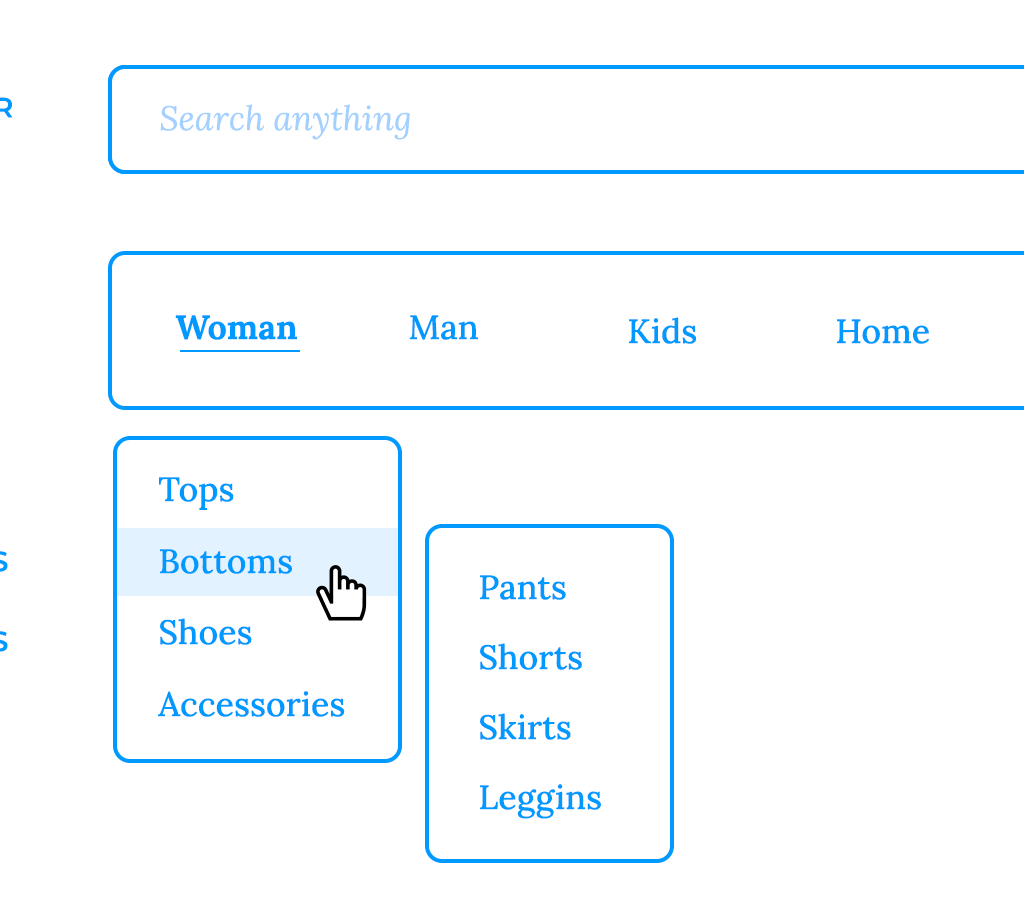
source: www.justinmind.com

An e-commerce website redesigned their navigation, simplifying the menu structure, adding a prominent search bar, and improving the mobile responsiveness. As a result, they saw a significant decrease in bounce rate and an increase in conversion rates.

What Makes This Worthwhile:

Seamless website navigation is essential for a positive user experience. It helps visitors find the information they need quickly and easily, encourages them to explore your website, and ultimately drives conversions. Investing in good website navigation is an investment in your online success.

The Role of Augmented Reality (AR) in Web Design

The Role of Augmented Reality (AR) in Web Design

Reading Time: 3 minutes

Augmented Reality (AR) is rapidly transforming the way we interact with the digital world. It overlays digital information onto the real world, creating immersive and engaging experiences. While AR is often associated with mobile apps, it’s increasingly playing a role in web design, opening up exciting new possibilities for businesses and users alike.

1. Enhanced Product Visualization:

AR allows users to visualize products in their own environment before making a purchase. For example, a furniture company could use AR to let customers see how a sofa would look in their living room. This enhances the shopping experience and reduces the likelihood of returns. Imagine trying on clothes virtually or seeing how a piece of art would look on your wall.

2. Interactive Product Demos:

AR can be used to create interactive product demos that allow users to explore product features and functionality in a more engaging way. For example, a car manufacturer could use AR to let potential customers explore the interior of a car and see how different features work. This provides a more immersive and informative experience than traditional product demos.

3. Immersive Brand Experiences:

AR can be used to create immersive brand experiences that connect with users on a deeper level. For example, a museum could use AR to bring historical artifacts to life, or a theme park could use AR to enhance the visitor experience. These types of experiences can create lasting memories and strengthen brand loyalty.

4. Gamification:

AR can be used to gamify the web experience, making it more fun and engaging for users. For example, a retailer could use AR to create a scavenger hunt that rewards users with discounts or prizes. Gamification can increase user engagement and drive traffic to your website.

5. Educational and Training Applications:

AR has significant potential in education and training. It can be used to create interactive learning experiences that make complex concepts easier to understand. For example, a medical school could use AR to allow students to explore the human body in a virtual environment.

6. Accessibility:

AR can make web experiences more accessible to users with disabilities. For example, AR can be used to provide real-time translations or to describe objects in a scene for visually impaired users.

7. Bridging the Physical and Digital Worlds:

AR blurs the lines between the physical and digital worlds, creating new opportunities for businesses to connect with their customers. It allows users to interact with digital content in a more natural and intuitive way.

Example Case Study:

Garnier, a leading cosmetics brand, has seamlessly integrated Augmented Reality (AR) into its website, particularly within its hair color selection experience, as demonstrated on their “Color Home” page. This feature allows users to virtually “try on” Garnier hair color shades in real-time, directly on their own image using their device’s camera. This empowers customers to shop with greater confidence, ensuring they find the perfect shade that complements their features. By allowing users to visualize the end result before making a purchase, Garnier has successfully enhanced the online shopping experience, leading to increased customer engagement, boosted sales of their hair color products, and a reduction in product returns due to mismatched expectations. The AR feature effectively bridges the gap between online browsing and the traditional in-store experience, offering a personalized and convenient way for consumers to explore Garnier’s extensive color range and make informed decisions. You can explore this feature yourself at Welcome to Color Home.

What Makes This Worthwhile:

AR is a game-changer for web design. It creates more immersive, engaging, and interactive experiences for users, leading to increased brand loyalty, higher conversion rates, and a more memorable online presence. As AR technology continues to evolve, its role in web design will only become more significant.

How to Perform a Website Audit (Step by Step)

How to Perform a Website Audit (Step by Step)

Reading Time: 2 minutes

A website audit is a comprehensive evaluation of your website’s performance, encompassing everything from technical SEO to user experience. It’s like a health check for your website, helping you identify areas for improvement and optimize its effectiveness. Here’s a step-by-step guide to performing a thorough website audit:

1. Define Your Goals:

Before diving in, clarify what you want to achieve with your audit. Are you focused on improving SEO, boosting conversions, or enhancing user experience? Defining your goals will help you prioritize your efforts and focus on the most relevant aspects of your website.

2. Crawl Your Website:

Use a website crawler like Screaming Frog, Sitebulb, or DeepCrawl to get a complete overview of your website’s structure. The crawler will identify all the pages on your website, including broken links, redirects, and other technical issues.

3. Analyze Technical SEO:

  • Check for Crawl Errors: Identify any crawl errors that prevent search engines from accessing your website’s content.
  • Evaluate Site Speed: Analyze your website’s loading speed on both desktop and mobile devices. Use tools like Google PageSpeed Insights or GTmetrix to identify areas for improvement.
  • Assess Mobile Friendliness: Ensure your website is responsive and provides a seamless user experience on all devices. Use Google’s Mobile-Friendly Test tool to check for any mobile usability issues.
  • Review XML Sitemap and Robots.txt: Ensure your XML sitemap is up-to-date and correctly submitted to search engines. Check your robots.txt file to make sure you’re not accidentally blocking important pages.
  • Examine HTTPS: Verify that your website is secure and uses HTTPS.

4. On-Page SEO Analysis:

  • Keyword Optimization: Review your website’s content and ensure that it’s optimized for relevant keywords. Check title tags, meta descriptions, headings, and image alt text.
  • Content Quality: Evaluate the quality and relevance of your website’s content. Make sure it’s informative, engaging, and provides value to your target audience.
  • Internal Linking: Analyze your internal linking structure and ensure that it’s logical and helps users navigate your website easily.
  • URL Structure: Review your URL structure and ensure that it’s clean, descriptive, and user-friendly.

5. Off-Page SEO Analysis:

  • Backlink Profile: Analyze your website’s backlink profile and identify any toxic or low-quality backlinks. Use tools like Ahrefs or Majestic to assess your backlink quality.
  • Domain Authority: Check your domain authority and identify opportunities to build high-quality backlinks to improve your website’s authority.

6. User Experience (UX) Analysis:

  • Navigation: Evaluate your website’s navigation and ensure that it’s intuitive and easy to use.
  • Information Architecture: Review the organization and structure of your website’s content.
  • Call to Actions (CTAs): Analyze your CTAs and ensure that they’re clear, compelling, and strategically placed.
  • User Flow: Map out the user flow on your website and identify any areas where users might get lost or frustrated.

7. Content Audit:

  • Content Inventory: Create a comprehensive inventory of all the content on your website.
  • Content Performance: Analyze the performance of your content and identify which pieces are performing well and which ones need improvement.
  • Content Gaps: Identify any content gaps and create a plan to fill them.

8. Analytics Review:

  • Website Traffic: Analyze your website’s traffic using Google Analytics to understand where your visitors are coming from and how they’re interacting with your website.
  • Conversion Tracking: Review your conversion tracking setup and ensure that you’re accurately tracking your website’s goals.

9. Competitor Analysis:

  • Identify Competitors: Identify your main competitors and analyze their websites.
  • Competitive Analysis: Compare your website to your competitors’ websites and identify areas where you can improve.

10. Create an Action Plan:

Based on the findings of your website audit, create a prioritized action plan to address the identified issues.

How Branding Affects Your SEO Strategy

How Branding Affects Your SEO Strategy

Reading Time: 3 minutes

Branding and SEO are not mutually exclusive; in fact, they work together synergistically to enhance your online presence. A strong brand can significantly impact your SEO strategy and improve your search engine rankings. Here’s how:

1. Brand Recognition and Search Volume:

A well-established brand is more likely to be searched for by name. When people search for your brand name, it signals to search engines that your brand is authoritative and relevant. This can lead to higher rankings for both branded and non-branded keywords.

2. Brand Mentions and Backlinks:

A strong brand is more likely to be mentioned and linked to by other websites. These brand mentions and backlinks act as votes of confidence in the eyes of search engines, boosting your website’s authority and improving your SEO.

3. Click-Through Rate (CTR):

A recognizable and trusted brand is more likely to attract clicks in search results. When your brand appears in search results, users are more likely to click on your listing if they recognize and trust your brand. A higher CTR signals to search engines that your website is relevant to the search query, which can improve your rankings.

4. User Engagement and Time on Site:

A strong brand can create a positive user experience, encouraging visitors to spend more time on your website and engage with your content. Higher user engagement metrics, such as time on site and pages per session, can signal to search engines that your website is valuable and relevant, leading to improved SEO.

5. Content Marketing and Brand Storytelling:

Branding plays a crucial role in content marketing. Your brand’s story, values, and personality should be reflected in your content. Creating high-quality content that aligns with your brand can attract and engage your target audience, leading to increased brand awareness and improved SEO.

6. Social Media Presence and Brand Authority:

A strong brand presence on social media can enhance your brand authority and visibility. Engaging with your audience on social media, sharing valuable content, and building a community around your brand can indirectly impact your SEO by increasing brand awareness and driving traffic to your website.

7. Local SEO and Brand Consistency:

For businesses with a local presence, brand consistency is crucial for local SEO. Ensure that your brand name, address, and phone number (NAP) are consistent across all online platforms, including your website, Google My Business profile, and other local directories. Consistent NAP information helps search engines understand that your business is legitimate and improves your local search rankings.

8. Influence on Keyword Strategy:

Your brand identity and target audience should inform your keyword strategy. Focus on keywords that are relevant to your brand, your products or services, and your target audience’s search habits. Aligning your keyword strategy with your brand can attract the right kind of traffic to your website and improve your conversion rates.

9. Brand Reputation Management:

Maintaining a positive brand reputation is essential for both branding and SEO. Monitor online reviews and mentions of your brand and address any negative feedback promptly. A positive brand reputation can improve user trust and encourage positive reviews, which can indirectly impact your SEO.

10. Long-Term SEO Strategy:

Building a strong brand takes time and effort, but it’s a worthwhile investment for long-term SEO success. A strong brand can create a sustainable competitive advantage and help your website rank higher in search results for years to come.

In conclusion, branding and SEO are intertwined. A strong brand can significantly enhance your SEO efforts by increasing brand recognition, attracting backlinks, improving click-through rates, and driving user engagement. By aligning your branding and SEO strategies, you can create a powerful online presence that attracts your target audience and drives business growth.

The Role of Data Analytics in Web Development

The Role of Data Analytics in Web Development

Reading Time: 2 minutes

Data analytics has become an indispensable part of modern web development. By collecting, analyzing, and interpreting data, developers can gain valuable insights into user behavior, website performance, and business outcomes. This post explores the crucial role of data analytics in web development.

Why Data Analytics is Important in Web Development:

  • Understanding User Behavior: Data analytics provides insights into how users interact with your website, including what pages they visit, how long they stay, and what actions they take.
  • Improving User Experience (UX): By understanding user behavior, developers can identify areas for improvement in website design and navigation, leading to a better user experience.
  • Optimizing Website Performance: Data analytics can help identify performance bottlenecks, such as slow loading times or broken links, allowing developers to optimize website speed and functionality.
  • Measuring Marketing Effectiveness: Data analytics can track the effectiveness of marketing campaigns, providing insights into which channels are driving the most traffic and conversions.
  • Informing Business Decisions: Data-driven insights can inform critical business decisions, such as product development, pricing strategies, and marketing campaigns.
  • Personalization: Data can be used to personalize the user experience, showing relevant content or offers to each user.
  • A/B Testing and Optimization: Data analytics is essential for A/B testing different website elements, allowing developers to optimize conversion rates and other key metrics.

Key Data Analytics Metrics for Web Development:

  • Website Traffic: Number of visitors, page views, and unique visitors.
  • Bounce Rate: Percentage of visitors who leave your website after viewing only one page.
  • Time on Site: Average time users spend on your website.
  • Conversion Rate: Percentage of visitors who complete a desired action, such as making a purchase or signing up for a newsletter.
  • Traffic Sources: Where your website traffic is coming from (e.g., organic search, social media, referrals).
  • User Demographics: Information about your website visitors, such as age, gender, and location.
  • Page Load Time: How long it takes for your website pages to load.
  • Click-Through Rate (CTR): Percentage of users who click on a specific link or button.

Tools for Data Analytics in Web Development:

  • Google Analytics: A powerful and widely used web analytics platform that provides detailed insights into website traffic and user behavior.
  • Google Search Console: A free tool that helps you monitor your website’s performance in Google search results.
  • Hotjar: A tool that provides heatmaps, session recordings, and other user behavior analytics.
  • Mixpanel: A product analytics platform that helps you understand how users interact with your web application.

How Data Analytics Impacts the Web Development Process:

  • Planning and Design: Data can inform the design and structure of your website, ensuring that it meets user needs and business objectives.
  • Development and Testing: Data can be used to identify and fix performance issues during the development process.
  • Post-Launch Analysis and Optimization: After launching your website, data analytics is crucial for monitoring performance and making ongoing improvements.

Conclusion:

Data analytics is an essential component of modern web development.

By leveraging data-driven insights, developers can create websites that are not only visually appealing but also highly effective in achieving business goals and providing a positive user experience. 

Author

Toyinsola Lydia

A results-oriented digital strategist with a proven track record of helping businesses achieve online success.

How AI Chatbots Are Changing the Customer Experience

How AI Chatbots Are Changing the Customer Experience

Reading Time: 2 minutes

Artificial intelligence (AI) is rapidly transforming various industries, and customer service is no exception. AI chatbots are revolutionizing how businesses interact with their customers, offering instant support, personalized experiences, and 24/7 availability. This post explores how AI chatbots are changing the customer experience.   

What are AI Chatbots?

AI chatbots are computer programs designed to simulate human conversation. They use natural language processing (NLP) and machine learning (ML) to understand and respond to user queries in a conversational manner. Unlike rule-based chatbots that follow pre-defined scripts, AI chatbots can learn from interactions and improve their responses over time.   

How AI Chatbots Are Changing the Customer Experience:

  • 24/7 Availability: Chatbots can provide instant support to customers anytime, day or night. This eliminates the need for customers to wait for business hours or deal with long hold times.
  • Instant Responses: Chatbots can answer common questions and resolve simple issues immediately, providing quick and efficient service.
  • Personalized Experiences: AI chatbots can personalize interactions by accessing customer data and tailoring responses to individual needs.
  • Handling High Volumes of Inquiries: Chatbots can handle a large number of conversations simultaneously, ensuring that all customers receive prompt attention.
  • Cost-Effectiveness: Chatbots can reduce the need for human customer service agents, saving businesses money on staffing and training costs.
  • Improved Efficiency: By automating routine tasks, chatbots free up human agents to focus on more complex issues, improving overall efficiency.
  • Consistent Service: Chatbots provide consistent and reliable service, ensuring that all customers receive the same level of support.
  • Data Collection and Analysis: Chatbots can collect valuable data about customer interactions, providing insights into customer needs and preferences.   

Examples of AI Chatbot Use Cases:

  • Answering frequently asked questions (FAQs): Chatbots can quickly answer common questions about products, services, or policies.
  • Providing customer support: Chatbots can help customers troubleshoot problems, resolve issues, and provide technical assistance.
  • Generating leads: Chatbots can engage website visitors and collect contact information for lead generation.
  • Scheduling appointments: Chatbots can help customers book appointments or schedule consultations.
  • Providing product recommendations: Chatbots can recommend products or services based on customer preferences and past purchases.
  • Processing orders and payments: Chatbots can help customers place orders, track shipments, and process payments.

Challenges and Considerations:

  • Understanding complex requests: While AI is improving rapidly, chatbots may still struggle to understand complex or nuanced requests.
  • Maintaining a human touch: It’s important to ensure that chatbot interactions feel natural and engaging, not robotic.
  • Handling sensitive information: Businesses must take precautions to protect customer data when using chatbots.
  • Proper implementation and training: Effective chatbot implementation requires careful planning, development, and training.

The Future of AI Chatbots in Customer Experience:

As AI technology continues to advance, chatbots will become even more sophisticated and capable. We can expect to see:

  • More personalized and proactive interactions: Chatbots will anticipate customer needs and offer proactive support.
  • Integration with other AI technologies: Chatbots will be integrated with other AI technologies, such as voice assistants and virtual reality.
  • Increased use of sentiment analysis: Chatbots will be able to better understand customer emotions and respond accordingly.

Conclusion:

AI chatbots are transforming the customer experience by providing instant, personalized, and 24/7 support.

By embracing this technology, businesses can improve customer satisfaction, increase efficiency, and gain a competitive edge.

Author

Toyinsola Lydia

A results-oriented digital strategist with a proven track record of helping businesses achieve online success.

person using search tool

SEO in 2025: What’s Changed and How to Adapt

Reading Time: 2 minutes

The landscape of SEO is constantly evolving. What worked yesterday might not be as effective tomorrow. As we move further into 2025, several key trends are shaping the future of search engine optimization.

1. The Rise of AI:

  • AI-Powered Content Creation: Tools like ChatGPT are revolutionizing content creation. While AI can assist with research, keyword suggestions, and even drafting initial content, it’s crucial to remember that human oversight is still essential. Focus on creating high-quality, original, and human-centric content that provides real value to your audience.
  • AI-Driven Search: Search engines are increasingly leveraging AI to understand user intent and deliver more relevant results. This means that focusing on user experience and creating content that truly answers user queries is more important than ever.

2. E-A-T (Expertise, Authoritativeness, Trustworthiness):

  • Google’s Emphasis: Google continues to prioritize content from authoritative sources.
  • Building Trust: Focus on establishing your brand as a trusted source of information within your industry. This can be achieved through:
    • High-quality, original content
    • Strong brand reputation
    • Positive online reviews
    • Authoritative backlinks from reputable websites

3. User Experience (UX) Reigns Supreme:

  • Page Speed: Fast loading times are crucial for both user experience and SEO. Optimize images, minimize HTTP requests, and leverage browser caching to improve page speed.
  • Mobile-First Indexing: Google prioritizes mobile-first indexing. Ensure your website is mobile-friendly, responsive, and provides a seamless user experience across all devices.1
  • Core Web Vitals: Focus on Core Web Vitals, a set of metrics that measure user experience, including page load speed, interactivity, and visual stability.

4. Video Content Continues to Dominate:

  • YouTube SEO: Optimize your YouTube videos for search by using relevant keywords in titles, descriptions, and tags.
  • Short-Form Video: Platforms like TikTok and Instagram Reels are gaining traction. Consider incorporating short-form video content into your SEO strategy.

5. Local SEO Remains Vital:

  • Google My Business: Maintain a complete and accurate Google My Business profile.
  • Local Citations: Ensure your business is listed on relevant local directories and citation sites.
  • Hyperlocal Content: Create content that targets specific local audiences and addresses their unique needs.

6. The Importance of Data Analysis:

  • Track Key Metrics: Monitor your website’s performance using tools like Google Analytics and Google Search Console.
  • Analyze Search Trends: Stay updated on the latest search trends and adjust your SEO strategy accordingly.
  • A/B Testing: Experiment with different approaches to your SEO strategy and analyze the results to identify what works best.


Adapting to the Evolving SEO Landscape:

  • Embrace Continuous Learning: The world of SEO is constantly evolving. Stay informed about the latest trends and best practices by following industry blogs, attending webinars, and connecting with other SEO professionals.
  • Focus on Long-Term Strategies: Avoid quick fixes and focus on building a strong foundation for long-term SEO success.
  • Prioritize User Experience: Always put the user first. Create high-quality content that is informative, engaging, and easy to consume.

By embracing these key trends and adapting your SEO strategy accordingly, you can ensure that your website remains visible, relevant, and successful in the ever-changing digital landscape.

Author

Toyinsola Lydia

A results-oriented digital strategist with a proven track record of helping businesses achieve online success.

interactive online store

How Micro-Interactions Improve User Engagement on Ecommerce Websites

Reading Time: 2 minutes

In the competitive world of e-commerce, capturing and maintaining user attention is paramount. While attractive product photography and compelling product descriptions are crucial, subtle yet impactful elements can significantly enhance the shopping experience. Enter: micro-interactions.

What are Micro-Interactions in E-commerce?

Micro-interactions are small, often subtle, animations or feedback mechanisms that occur in response to a user’s action within an online store. These tiny moments of delight can transform a mundane shopping experience into an engaging and memorable one.

Examples of Micro-Interactions in E-commerce:

  • Product Page Animations:
    • Hover Effects: Subtle animations like zooming in on product details, highlighting key features, or showcasing different color options when a user hovers over an image.
    • 360° Product Views: Allowing users to rotate products with smooth animations provides a more immersive shopping experience.
    • “Add to Cart” Animations: A subtle animation, like a product smoothly gliding into the cart icon, provides visual confirmation and adds a touch of delight.
  • Checkout Process:
    • Progress Bars: Visual indicators of the checkout stages help users track their progress and reduce anxiety.
    • Animated Loading Indicators: Subtle animations during loading screens keep users engaged and reassure them that the process is still active.
  • Personalized Experiences:
    • “Recently Viewed” Sections: Gently reminding users of products they recently viewed can encourage them to return and complete their purchase.
    • Personalized Recommendations: Subtle animations can draw attention to recommended products based on user browsing history.


How Micro-Interactions Improve User Engagement in E-commerce:

  • Increased Product Discoverability: Animations can draw attention to key product features, encouraging users to explore and learn more.
  • Enhanced Shopping Experience: Smooth animations and intuitive interactions make the shopping process more enjoyable and less cumbersome.
  • Reduced Cart Abandonment: By providing clear visual feedback and a sense of progress, micro-interactions can help to reduce cart abandonment rates.
  • Increased Brand Loyalty: A well-designed user experience, including thoughtful micro-interactions, can foster a positive brand perception and encourage repeat business.


Key Considerations for E-commerce:

  • Mobile Optimization: Ensure all micro-interactions are optimized for mobile devices, as a significant portion of e-commerce traffic comes from mobile.
  • Performance: Prioritize performance. Overly complex animations can slow down page loading times and negatively impact user experience.
  • Accessibility: Design micro-interactions with accessibility in mind. Ensure they are visible and usable for all users, including those with disabilities.


Tools for Creating Micro-Interactions in E-commerce:

  • E-commerce Platforms: Many e-commerce platforms, such as Shopify and WooCommerce, offer built-in features for creating simple animations and interactive elements.
  • JavaScript Libraries: Libraries like GreenSock and Anime.js provide powerful tools for creating custom animations within your e-commerce store.
  • Design Tools: Tools like Figma and Adobe After Effects can be used to prototype and design micro-interactions before implementing them on your website.


Conclusion

Micro-interactions are not just decorative flourishes; they are strategic elements that can significantly enhance the user experience on your e-commerce website. By carefully considering user needs and implementing subtle, impactful animations, you can create a more engaging, enjoyable, and ultimately more successful online shopping experience.

Disclaimer: The effectiveness of micro-interactions will vary depending on the specific e-commerce store, target audience, and brand identity. It’s crucial to test and iterate on your designs to ensure they are achieving the desired outcome.

Author

Toyinsola Lydia

A results-oriented digital strategist with a proven track record of helping businesses achieve online success.

flow chart on laptop

How to Create an Effective User Journey on Your Website

Reading Time: 3 minutes

A well-defined user journey is crucial for website success. It maps out the steps a user takes to achieve a specific goal on your site, from initial awareness to final conversion. By understanding and optimizing this journey, you can improve user experience, increase conversions, and ultimately achieve your business objectives. This post will guide you through creating an effective user journey for your website.

What is a User Journey?

A user journey is a visual representation of the steps a user takes to interact with your website. It outlines their motivations, touchpoints, and potential pain points at each stage. Understanding the user journey helps you anticipate user needs and optimize your website to meet those needs effectively.

Why is a User Journey Important?

  • Improved User Experience (UX): By understanding user behavior, you can create a more intuitive and enjoyable experience.
  • Increased Conversions: A well-optimized user journey can guide users smoothly towards desired actions, such as making a purchase or signing up for a newsletter.
  • Reduced Bounce Rate: By addressing potential pain points, you can keep users engaged and prevent them from leaving your site.
  • Better Customer Understanding: Creating user journeys helps you empathize with your users and understand their needs and motivations.
  • Effective Marketing Strategies: User journey mapping informs your marketing efforts by identifying the most effective channels and touchpoints to reach your target audience.

Steps to Create an Effective User Journey:

  1. Define Your Target Audience: Start by clearly defining your ideal customer. Create user personas that represent different segments of your target audience. These personas should include demographic information, motivations, goals, and pain points.
  2. Set Clear Objectives: Determine what you want users to achieve on your website. These objectives could include:
    • Making a purchase
    • Signing up for a newsletter
    • Downloading a resource
    • Contacting your business
  3. Map Out the Stages of the Journey: Identify the key stages a user goes through to achieve the desired objective. A typical user journey might include:
    • Awareness: The user becomes aware of your brand or product.
    • Consideration: The user researches your offerings and compares them to competitors.
    • Decision: The user decides to purchase or engage with your business.
    • Action: The user completes the desired action on your website.
    • Retention/Advocacy: The user becomes a loyal customer and potentially recommends your business to others.
  4. Identify Touchpoints: Determine all the points where users interact with your brand, both online and offline. These touchpoints could include:
    • Website
    • Social media
    • Email
    • Search engines
    • Online ads
  5. Analyze User Behavior: Use analytics tools like Google Analytics to track user behavior on your website. This data can provide valuable insights into how users navigate your site and where they encounter difficulties.
  6. Identify Pain Points: Identify any obstacles or frustrations users might encounter during their journey. These pain points could include:
    • Difficult navigation
    • Slow loading times
    • Confusing forms
    • Lack of information
  7. Optimize the User Journey: Based on your analysis, optimize your website to address pain points and improve the overall user experience. This might involve:
    • Improving website navigation
    • Optimizing website speed
    • Simplifying forms
    • Providing clear and concise information
  8. Test and Iterate: Continuously test and refine your user journey based on user feedback and data analysis.

Tools for Creating User Journeys:

  • Smaply: A user-friendly tool for creating visual user journey maps.
  • UXPressia: A platform for creating customer journey maps, persona templates, and impact maps.
  • Miro: An online collaborative whiteboard platform that can be used for user journey mapping.

Conclusion:

Creating an effective user journey is an ongoing process. By understanding your users and continuously optimizing their experience, you can create a website that not only meets their needs but also achieves your business objectives.

Author

Toyinsola Lydia

A results-oriented digital strategist with a proven track record of helping businesses achieve online success.

electric car landing page

5 Key Elements Every Homepage Should Have in 2025

Reading Time: 3 minutes

Your homepage is the digital front door to your business. It’s often the first impression potential customers have of your brand, making it crucial to design it effectively. As we approach 2025, certain elements are becoming increasingly essential for a successful homepage. This post will outline the 5 key elements every homepage should have in 2025.

1. Compelling Above-the-Fold Content:

The area of your website visible without scrolling is known as “above the fold.” This is prime real estate and should immediately capture visitors’ attention. It should include:

  • A clear and concise headline: This should communicate your unique value proposition in a few words.
  • A brief supporting statement: This expands on the headline and provides more context.
  • A compelling visual: This could be an image, video, or animation that visually represents your brand.
  • A clear call to action (CTA): This should encourage visitors to take the next step, such as browsing your products or contacting you.
In 2025, expect even more emphasis on interactive and dynamic above-the-fold content, possibly incorporating augmented reality (AR) or personalized experiences.

2. Seamless Mobile Experience:

Mobile browsing has long surpassed desktop, and this trend will only continue. Your homepage must be fully responsive and provide a seamless experience on all devices. This includes:

  • Fast loading times: Mobile users are impatient. Optimize your website’s performance for quick loading speeds.
  • Easy navigation: Ensure your navigation is intuitive and easy to use on smaller screens.
  • Touch-friendly design: Make sure all interactive elements are easily tappable on touchscreens.
In 2025, expect mobile-first indexing to be even more critical, making mobile optimization non-negotiable.

3. Clear Value Proposition:

Visitors should understand within seconds what your business offers and why they should choose you. Your value proposition should be clearly communicated throughout your homepage, especially in the above-the-fold section. It should answer the question: “What’s in it for me?”

In 2025, with increasing competition, a strong and unique value proposition will be more important than ever.

4. Social Proof and Trust Signals:

Building trust is essential for converting visitors into customers. Incorporate social proof and trust signals on your homepage, such as:

  • Customer testimonials: Display positive reviews and testimonials from satisfied customers.
  • Case studies: Showcase successful projects or client stories.
  • Security badges: Display security badges to reassure visitors that their information is safe.
  • Social media feeds: Integrate your social media feeds to show social engagement.
In 2025, expect greater emphasis on authentic and verifiable social proof, as consumers become more discerning.

5. Intuitive Navigation and Clear Calls to Action:

Your homepage should guide visitors seamlessly to the information they need. This requires:

  • Clear and concise navigation menus: Make it easy for visitors to find different sections of your website.
  • Strategic placement of CTAs: Use clear and compelling CTAs throughout your homepage to encourage desired actions.
In 2025, expect more personalized and contextualized CTAs, based on user behavior and preferences.

Looking Ahead to 2025:

In addition to these 5 key elements, expect the following trends to shape homepage design in 2025:

  • Increased personalization: Homepages will become even more personalized based on user data and preferences.
  • Greater use of AI and automation: AI will be used to optimize homepage content and user experience.
  • More immersive experiences: Expect more interactive and engaging experiences, possibly incorporating virtual reality (VR) or augmented reality (AR).

Conclusion:

By incorporating these 5 key elements and staying ahead of emerging trends, you can create a homepage that not only captures visitors’ attention but also drives conversions and achieves your business goals in 2025 and beyond.

Author

Toyinsola Lydia

A results-oriented digital strategist with a proven track record of helping businesses achieve online success.